All-in-one screen capture suite with editing and publishing features
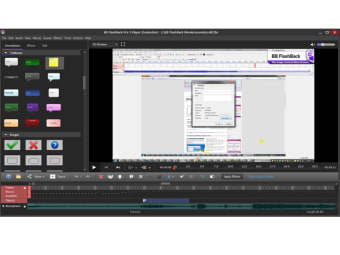
BB FlashBack has the advantage over similar screen recorders in that it can record video activity in different formats and allows you to add all sorts of text, images and sound.
The program is very customisable in that it can be customised to take snapshots of only certain parts of a screen at all times - so you can make it dedicated to just the left or right hand side of the screen.
Another key benefit is that it's very easy to create shortcuts for screen recordings with the keyboard. In this way, you hardly need to use the mouse.
It's the screen recorder with all the features you need to make high quality movies and deliver them in the right format for you and your audience.
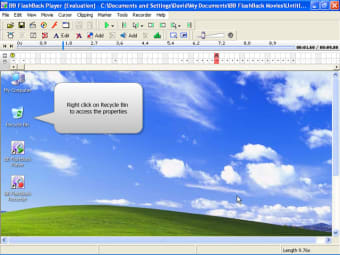
Probably the best feature though is that you can easily add text, images and sound. You can record a commentary while recording the screen or add it later.
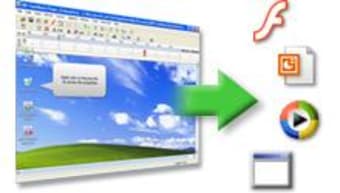
The commentary can be in MP3 or WAV format and you can add text boxes, tips bubbles and images to your movie. When exporting, BB FlashBack screen recorder exports to Flash, AVI, WMV, EXE and PowerPoint so it's pretty flexible in that respect too.
An excellent video screen cast solution that's simple enough for beginners but has enough advanced features to keep experts happy.
Easy to use screen recorder creates quality Flash / AVI / WMV movies with sound.
FlashBack Professional is a screen recording application for creating tutorials, demonstrations or training material. New in FlashBack 5: Language translation of textboxes and buttons; Magnifier effect to enlarge parts of the movie; Password protection for recordings you want to keep secure; FlashBack Connect customisation options to add company branding; Dedicated online video sharing website - the FlashBack Connect online service; New Graphical User Interface. Other features: Fade Transitions - add transition effects to join clips when creating your movie. Gallery - Simplify the editing workflow by creating a gallery of in-movie annotations like textboxes, images, highlights etc. Blur Tool - Blur out sensitive details in a movie - great for creating movies that feature sensitive or personal data. Record-time Notes - Make notes during recording and see them as textboxes in the movie. Export to GIF format - For easy embedding into Web pages. Other features in FlashBack Pro include: One-click upload to YouTube, Blip.tv and Revver, Undo and Redo, QuickTime (H264) Exports, Support for Flash Video (FLV) Format, Flash Export Improvements, (full-screen modem, enhanced playback and volume controls, greater control over movie download and playback), Import of AVI or WMV as a webcam video. Other features include Pan & Zoom, Precision Sound Editing, Webcam Capture, Action Buttons, Vista Capture Driver, Recording Wizard, Highlight Tool, Mouse Movement Correction. Add text, images, sound, webcam and spoken commentary, and use the extensive editing functions to create a high quality presentation. Movies can be exported to Flash, AVI, WMV, PPT or EXE for use on a CD-ROM, over a network or on the web. Typically, users can be creating professional movies with FlashBack in minutes. Example movies created with FlashBack can be found on our website at: flashbackrecorder.com/
Laws concerning the use of this software vary from country to country. We do not encourage or condone the use of this program if it is in violation of these laws. Softonic may receive a referral fee if you click or buy any of the products featured here.